Glacier
Glacier

Plan and write your story
in one file.

A woven tree of scenes, a board of cards, and a page to write on — the plan and the prose in the same place, so the outline never drifts away from the draft.

Get started See what it does

Your story is a file on your own drive. We never store your writing.

What Glacier is

A writing studio, not a word processor.

Most tools make you choose: an outliner that cannot hold prose, or a document that cannot hold a structure. Glacier is one file that is both — the plan of your story and the place you write it.

You build a tree of scenes, give each one a purpose, and write straight into it. The structure stays visible while you draft, so you always know where you are and what the scene in front of you is for.
Structure

Scenes with a job

Every scene carries what it is for, not just what happens in it. Parts, chapters and acts fall out of the tree rather than being imposed on it.

Craft

Setups and payoffs

Link a setup to the scene that pays it off. Nothing planted quietly goes missing between draft one and draft four.

People

Characters and reference

Profiles and reference pages live beside the draft — what each person wants, and what they believe about themselves that is not quite true.

How it works

Three ways to see the same story.

Nothing is duplicated between them. They are the same scenes, seen differently depending on what you are trying to work out.

Outline

Write

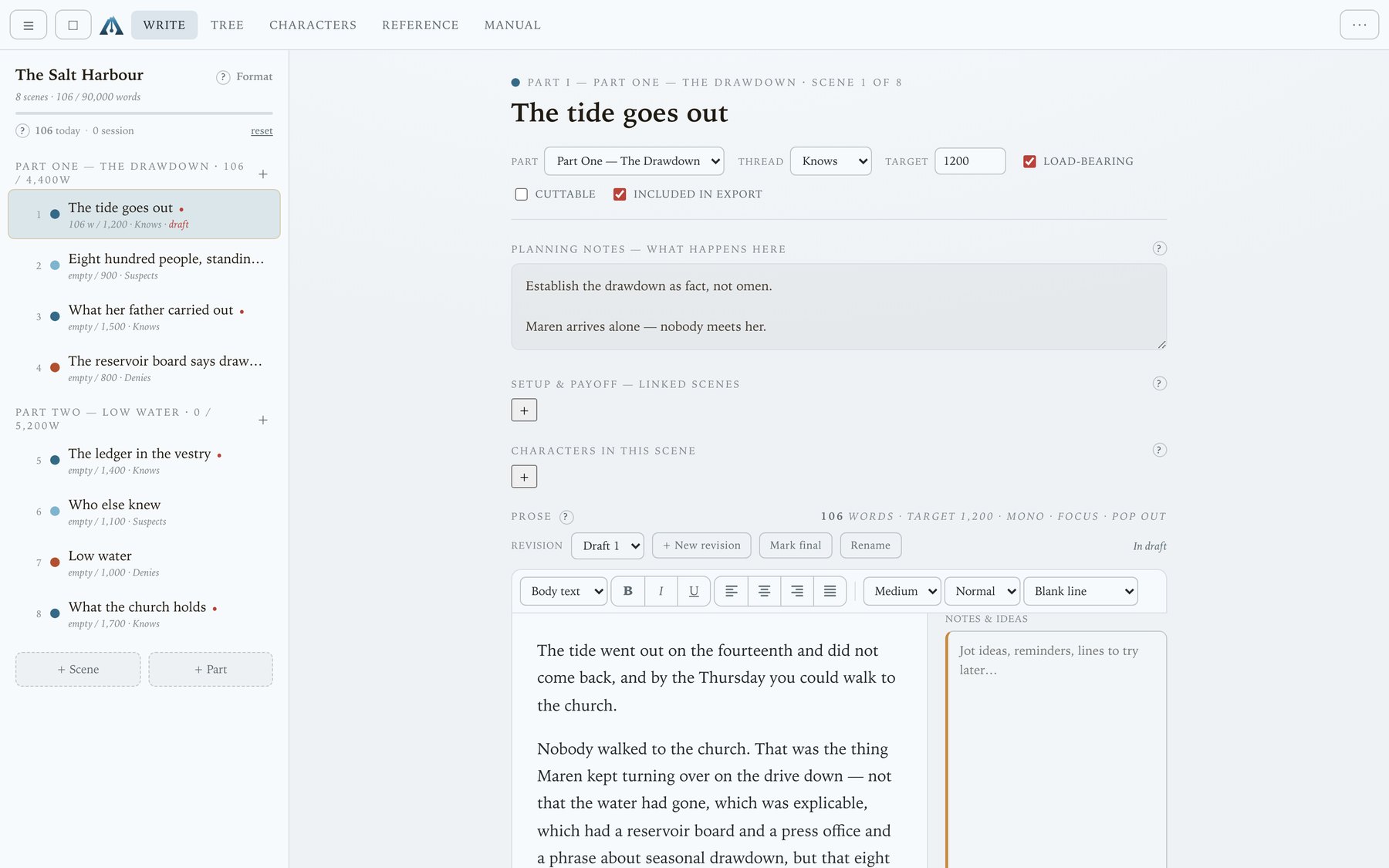
The outline and the scene editor side by side. Autosave as you type, live word and page counts, and a focus mode when the rest of it is in the way.

Tree

See the shape

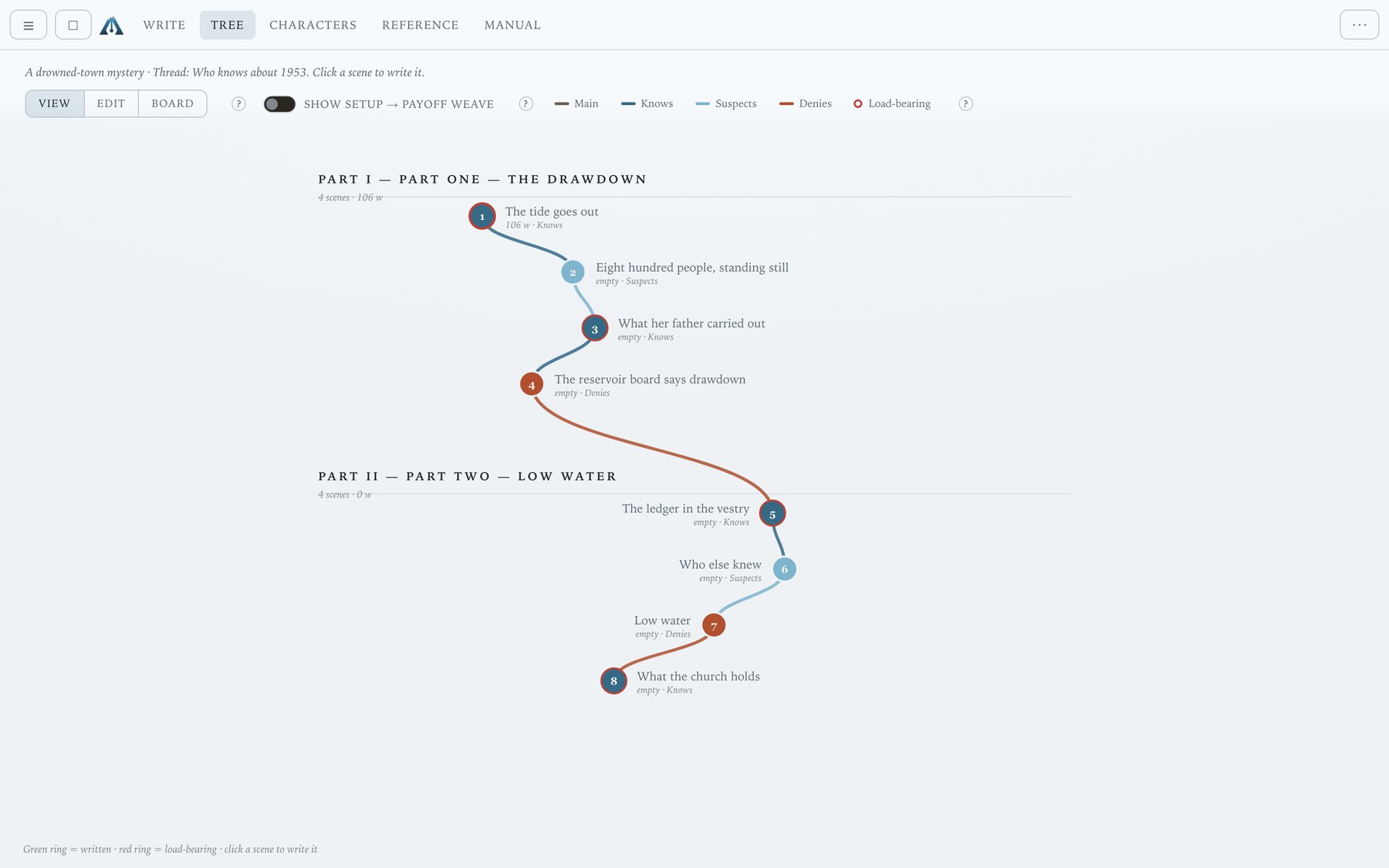
The whole story as a woven map — every scene drawn in place, with the through-line coloured so you can see the shape and the connections at a glance.

Board

Move it around

The same story as a wall of cards — the corkboard a writers' room works on. An Ideas column holds scenes you have thought of but not committed to.

Six formats, one tool

Prose, screenplay, TV drama, TV sitcom, comic and radio. The format changes the rules Glacier applies — a comic reports pages and panels rather than words; a screenplay knows about sluglines, dialogue and act structure — but the tree, the board and the craft tools are the same throughout.

Your files

Your story is a file. On your drive.

Not a row in our database. Not a folder in an account you have to keep paying for. One file you can copy, email, back up, or put in whichever cloud drive you already trust.

We never store your writing

The only thing the server keeps is your email address and whether your licence is active. Your manuscript never reaches it — there is nothing of yours for us to lose, leak, or hold hostage.

It keeps working offline

Your licence is verified on your own machine, so a dead connection — ours or yours — does not stop you writing. Sign in again occasionally and that is all.

Backups and exports you control

Back up, export to text, and auto-backup are built in. Because we hold nothing, keeping copies is genuinely yours to do — and the tools are there to do it.

No lock-in

Export the manuscript as plain text whenever you like. If you ever stop using Glacier, you leave with the thing you came to write.

Platforms

Where Glacier runs.

Web

Any modern browser

Nothing to install. On desktop Chromium your story is written straight to a file on your drive as you type; elsewhere it is held safely in the browser with Back up and Open to move it about.

Desktop

macOS, Windows, Linux

The same app as a native build, about 5 MB. It talks to the real filesystem, so “your story is a file on your drive, written as you type” is true whichever browser you happen to prefer.

iPad

A separate App Store app

Bought on the App Store and unlocked there. It needs no account with us and never touches this licence system.Confirm status

Pricing

Pay once, per platform.

No subscription. Glacier is sold per platform because a desktop build is real, permanent maintenance that a payment made years ago cannot fund — and buying in two steps never costs more than the bundle did on day one.

Prices in GBP, VAT added at checkout where it applies.Confirm currency & tax

Get access

How you launch Glacier.

There is no password to forget. You sign in with a link sent to your email, and after that your licence lives on your machine.

  1. Enter your email. We send a one-time sign-in link — no password to choose or lose.
  2. Open the link. That signs you in on this device.
  3. Buy the platform you want, if you have not already. Checkout is handled by Stripe; we never see your card.
  4. Write. Glacier opens and a licence is stored on your machine, so it keeps working offline and refreshes quietly when you are online.

Already bought it? Sign in on this device and Glacier opens straight away.

Sign in or create your account

One email address, one link. That is the whole account.

Questions

Do I need an internet connection to write?

No. Your licence is verified on your own machine, so once you are set up you can write with no connection at all. Glacier tops the licence up quietly whenever you happen to be online.

Where is my work stored?

On your drive, as a file you control. Our server keeps only your email address and whether your licence is active — your manuscript never reaches it.

I bought the web version. Can I add desktop later?

Yes, and it is priced so that buying in two steps never costs more than the bundle did on day one. Sign in and the upgrade will be the only thing offered.

Is it a subscription?

No. You pay once for a platform and keep it.Confirm update policy

What about refunds?

Refund policy to be written